Monday, July 15, 2013

evo -x4 romfor galaxy y

evox4 for galaxy y

To the fans of the Evo-X rom series by b16h22 from xda-developers forums, version 4 is now out. With more preferences added, improved system apps and a few other features and improvements.

Changelog:
  • New evo preferences
  • Change statusbar layout between normal/pseudo-phablet/pseudo-tablet view
  • Set any color and transparency for statusbar
  • Set any color and transparency for notification pulldown background
  • Show/Hide battery in pulldown
  • Three panels in phablet view including notification,quicksettings,slider controls
  • Two panel view (android 4.2) in normal and tablet layout
  • Aokp look-alike 6 toggles with show/hide option
  • Hide/Show, color clocks in both expanded and statusbar
  • Show/hide day of week in expanded 
  • Change color of quicksettings toggles
  • Change color of quicksettings text
  • Set user display picture and name
  • Hide/show 15 toggles
  • Show/hide slider controls
  • New messaging app
  • New contacts app
  • New calendar app
  • New myfiles app
  • Better phone.apk
  • Better dialer
  • New music player
  • Holo launcher
  • Better settings app
  • Better Gmail app
Screenshots:

Download - Click here.

Instructions:
  1. Download the zip file to your sdcard
  2. Power off your phone and boot into Recovery mode
  3. Boot into CWM Recovery
  4. Wipe data and cache
  5. Go to install zip from sdcard
  6. Select choose zip rom sdcard
  7. Locate the zip and choose it
  8. Choose Yes to confirm
  9. After installation is complete, go back, wipe cache and data again
  10. Reboot
Source:
http://forum.xda-developers.com/showthread.php?t=1757125

Smart ram booster latest v-1.7

Smart RAM Booster Pro v1.7 APK


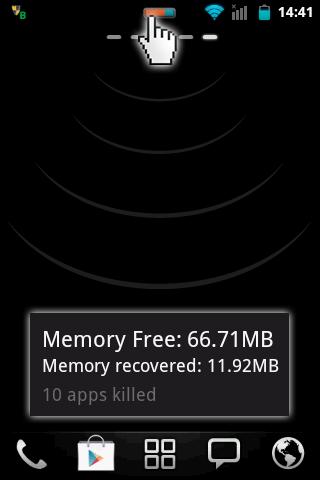
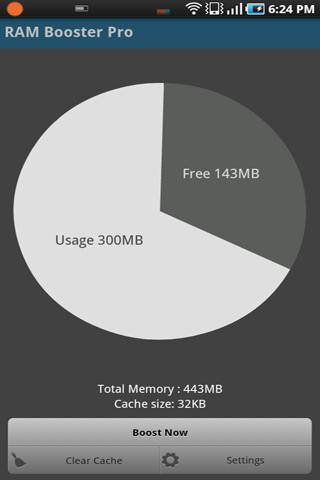
The most beautiful part of this app is a small, configurable widget that places on top of any app and one-click to RAM boost!


Smart RAM Booster Pro
The most beautiful part of this app is a small, configurable widget that places on top of any app and one-click to RAM boost.
Recommended by AddictiveTips.
Hotest Apps by AppBrain.

Most of Android devices bundle with limited memory. Android task manager will selectively kill low priority tasks in order to reserve memory to higher priority task. That’s not always run at an appropriate time, causing low responsive apps, lagging, especially when you launch a new app after heavily browsing web pages. It causes a worse experience.

How RAM Booster works
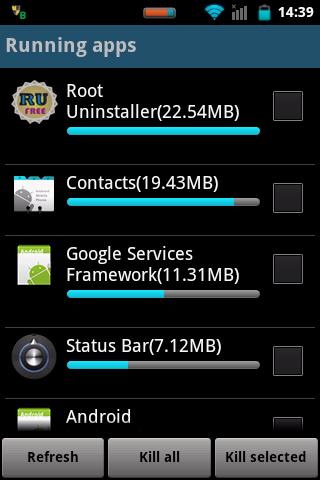
  • RAM Booster is designed to overcome these issues by selectively kill less important apps that are running in the background but consumes considerable device’s memory.
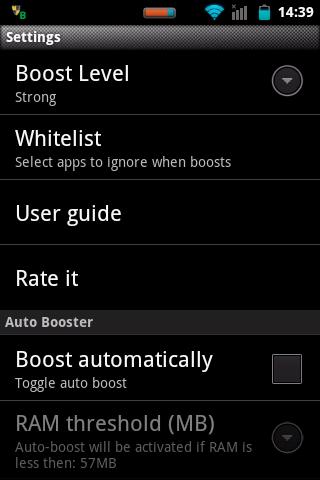
RAM Booster comes with auto-boost in 4 levels: aggressive, strong, medium, gentle.
  • Aggressive: kill most of low priority apps
  • Strong: Kill apps that is low priority as well as consume lightly below an “average”
  • Medium: kill apps that consumes memory above an “average”
  • Gentle: kill only apps that uses considerable memory
“Average” is evaluated real-time based on running apps and change over time.
How to work RAM Booster
There are 5 ways to boost
  1. Auto-boost: boost automatically under RAM available & timing conditions
  2. Overlay widget – Enable RAM Booster overlay widget (on by default), adjust widget’s position, and tap on widget to boost anytime you want
  3. Home screen widget – one tap to boost (long-press your home screen>Widget to add RAM Booster widget)
  4. Notification bar – one tap to boost (toggle notification bar visibility in app’s setting)
  5. Boost Now – tap this button from app’s main screen
Tool:
  • 1-click cache cleaner
There are plenty options from app’s settings to twist boosting process:
  • Boost level: select a boost level
  • Nice themes at your choice
  • Whitelist apps: apps will not be killed when boosting
  • Boost automatically: auto-boost, come with minimal RAM threshold and Boost interval
  • Report style- define how to show reports
  • Feedback- a haptic feedback when touch on boost widget
  • Overlay widget position/size - Change overlay widget position/size
  • Overlay widget transparency- Change transparent/opaque level
  • OnClick/OnLongClick options for overlay widget
What's in this version : (Updated : Jan 16, 2013)
  • Added new widget 1x1 "Fast Reboot" (only Pro)
  • Support "Hide overlay widget when any app run on full screen"
  • Added languages: Spanish/America, Portugese/Portugal, Bulgarian
Required Android O/S : 2.1+

Screenshots :
   
Download : 1Mb APK

Hyerion 8 rom for galaxy y

JellyBean experience at its best
Everything you love about Hyperion and
JellyBean — the gorgeous UI , fast and fluid
performance, battery life — is everything you’ll
love about the new Hyperion, too. And you can
have the best of both it in one ROM.
A rom worthy of all Galaxy Y
Fast performance, superb stability, mouth
watering UI, useful features — It's something for
everyone. And Everything!
Incredible performance
Known for its fast, fluid performance, Hyperion
doesn’t disappoint. It features 23 powerful and
power-efficient CPU governors and 4 I/O
Scheduler, which makes everything you do feel
smooth and natural.
Hyperion wouldn’t be Hyperion without
incredible battery life . Even with so much
performance packed into such a small space, it
still lasts up to 2 days on a single charge* . So
you can read, watch, play, write, and create
whatever you want, as long as you want.
*battery life based on moderate usage with all
radios turned on at default policy settings.

Hyperion 8 highlights:
Total ear-gasm: ALSA ( AlsaProject) + Beats
Audio Engine v2
We combined and tuned up two sound engines
for superb sound quality when listening to
music. This time, sound enhancements are
activated at startup without the use of DSP
Manager. What does that mean? No more force
close when you connect/disconnect mass storage
mode on PC.
Mouth watering pixel goodness
Like JellyBean looks but sluggish like old granny?
Worry no more! Hyperion 8 combines JellyBean
UI and transparency into a piece of art. We don't
simply take frameworks, systemUI and put it in a
blender. We make sure we put "what belongs
together".
Project butter Hyperion style
We combined all the best tweaks out there for a
superb super smooth UI. Others would say "No!
That's not real! Project butter is JB only", yes
that is correct if you can't read between the
lines.
More juice more fun!
We hate running out of juice as much as you do,
so we made sure you can get the most of your
battery. We put 23 CPU governors and 5 IO
schedulers to tame that nasty CPU! And with
deep sleep? Your phone will get more sleep
than you do! -well at least for me this is a true
statement.

Features:
Basic - all custom roms must have:
1. De-Odexed
2. Zipaligned
3. Recompressed APKS
4. Optimized APK Images
5. Rooted
6. BusyBox and BusyBox run-parts support
7. Apps2SDenabled

Common - though not working in other roms:
1. 15 Toggle Notification Drawer
2. 6 Lockscreens from Gingerbread AOSP/CM with
custom app starter and gesture unlock
3. Status bar Tweaks + TEAM battery bar
4. 4-way Reboot Options
5. Expanded Power Menu (because themers and
mods crash systemUI most of the time, we need
other ways of rebooting)

Unique - not all custom roms have:
1. No SMS Bug
2. No false Android version
3. No useless features
4. Least branding (Like creed parts or cod parts or
whatever. We don't like that. It's your phone,
not ours)

Advanced:
1. EXT4 File System Support
2. CIFS
3. Swap Support
4. BaCeM Tweak
5. UnderVolt Support
6. Firewall Support (DroidWall Open-Source Project)
7. Ad-blocking host file

Plus - only Hyperion:
1. Supercharged Hyperion Core v2 with Adrenaline
Engine v4.4
2. Transparent JellyBean user interface
3. Ear-gasmic sound quality
4. Integrated Autostart manager, Firewall and
Network Unlocker
5. Modular system structure
6. System Replacer

Experimental:
1. Force GPU Rendering - Force use of GPU for 2D
rendering
2. Disable HW overlays - Always use GPU for screen
compositing
3. Allow purging of assets - Purging of bitmap
memory assets allows freeing of more RAM when
needed (you can now get as low as 85-90mb
used RAM)
4. 32bit transparency - Better graphics
performance and full transparency support

It comes with savie kernel which saves battery a lot through various cpu settings and management!!


Now the steps and requirements!!

Requirements:-
1.Rooted phone
2.CWM
3.Rom

Backup all your apps and contacts through titanium backup or any other app of your choice!


Steps:-
1.Switch off your phone and go to recovery by pressing volume up+home+power button

2.Go to install from sd and patch CWM by opening it!

3. Now go to Mounts & storage and mount everything. System, sd card, sd ext, data

4. Go back to Advanced and clear battery stats and dalvic cache.

5. Go back and select clear data. It will format your phone. Now select clear cache

6. Go to install zip from sd > apply zip from sd card. Locate the rom zip file and select it! This will install the rom!

7. After installation completed go back and reboot!

8. First reboot may take time! At the Galaxy Y logo about 1.20mins and at the hyperion logo around 2minutes! Your phone will have a fresh look and have a fresh start!!

Enjoy!!

Just remember 3 steps! Mount everything, Clear everything, install zip!!


Here are some screenshots of the ROM from my phone!!


Wifi bug fixed:-
Go HERE

No other problems or bugs!!

Note:-We are not responsible for any loss of your phone! If your phone is bricked ,dont worry its a soft one. You can correct it manually or go to your Service centre

google goggles

'Google Goggles' on ARMV6 systems, Like our Galaxy Y !!

Here is the Market Link: https://play.google.com/store/apps/d...BzLnVudmVpbCJd

As you see it doesn't work it says: 'This app is not compatible with your Samsung GT-S5360.'
To make it work download this file: https://www.dropbox.com/s/50eymr1rxoibi4p/g181.apk
Install it like any other APK and there you go !

This file is ripped from the store and it works on ARMV6 devices ! (Y etc..)

Enjoy !!!

tubemate

TubeMate APK helps you to download from the best video sharing website, with TubeMate YouTube Downloader for Android you can search and take the video easily. In our archive, the current version is 1.05.47 and this is the latest version this month. In the latest version the developer has add more features and fixed some bugs. So, it’s better to download the newest if you use old version. This app is free for everyone, so we share tubemate apk for you for free.
TubeMate app needs Android 2.1 as minimum system and it just about 2MB. Small but it’s very useful. What’s new in the latest version? Internal Player : Landscape lock, Add resolutions(VP8, 3D), new translation has been added in 1.05.47.
This is more information about TubeMate for Android. If you are the new user you have to read it to get more information.
Download TubeMate APK – TubeMate YouTube Android TubeMate APK

Type: Multimedia Apps
Author: Jesicca Wily
TubeMate YouTube Downloader enables you to quickly access, search, share, and download YouTube videos. Because downloading always happens in the background, you can go on watching YouTube, surfing the Internet, tweeting as you download.
TubeMate YouTube Downloader
Features
  • Fast download mode(with multiple connections for a download)
  • Multiple download resolution options
  • Background, multi-download
  • Resume downloading
  • Convert to MP3 (powered by MP3 Media Converter)
  • Playlist as video/audio(powered by Meridian Player)
  • Share your video finds via Google Buzz, Twitter or e-mail at the tap of a button
  • YouTube search and related videos suggestions
  • Save favorite videos to your YouTube account, create playlists
  • Many languages
Instructions
  1. Download full app on the links below.
  2. TubeMate on Google Play (unavailable)
  3. TubeMate apk files

Juice defender yltimate for galaxy y battery problem


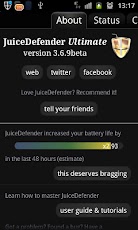
Dear Guys We All Know the Battery Life of Android Devices is very low if u Play Game or Surfing Internet So here is the solution from this apps u can increase upto 4X Battery Life of your Android Devices.

Battery life too good to be true!
For battery life just too good to be true, JuiceDefender Ultimate employs a ton of advanced, fully customizable and really effective power saving features.
Absolute control for the highest energy efficiency: try the ultimate battery saving experience!

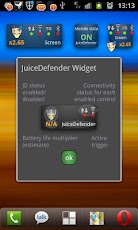
JuiceDefender is a powerful yet easy to use power manager app specifically designed to extend the battery life of your Android device. Packed with smart functions, it automatically and transparently manages the most battery draining components, like 3G/4G connectivity and WiFi.
JuiceDefender Ultimate enables _all_ the advanced features in JuiceDefender:
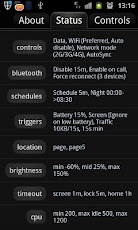
- automated WiFi control - also Location-aware!
- all schedule intervals
- night, peak, weekend schedules
- the Extreme profile
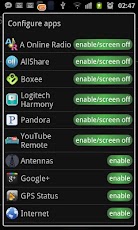
- configurable Apps with interactive mode
- 2G/3G/4G network mode switching control*
- CPU frequency scaling*
- Smart Brightness control with integrated screen filter and "night tint" mode
- Timeout control to minimize the hassle of the lockscreen, or disable it altogether when you're at home
- Bluetooth control - it can also automatically reconnect to your headset/handsfree!
- ...and every setting is fully customizable!
* Available if supported by your ROM


Every One Want A Good Player to Play Their Music And Movies With Lots OF facilities And Options To Make It More Better. Like Balance The Sound And Video Quality As You Need. And It Support All Type Of Video And Audio Format. 
- See more at: http://www.wayofhacking.com/2013/07/top-10-android-apps-2013.html#sthash.U51A0qB1.dpuf
Every One Want A Good Player to Play Their Music And Movies With Lots OF facilities And Options To Make It More Better. Like Balance The Sound And Video Quality As You Need. And It Support All Type Of Video And Audio Format. 
- See more at: http://www.wayofhacking.com/2013/07/top-10-android-apps-2013.html#sthash.U51A0qB1.dpuf
Every One Want A Good Player to Play Their Music And Movies With Lots OF facilities And Options To Make It More Better. Like Balance The Sound And Video Quality As You Need. And It Support All Type Of Video And Audio Format. 
- See more at: http://www.wayofhacking.com/2013/07/top-10-android-apps-2013.html#sthash.U51A0qB1.dpuf
Every One Want A Good Player to Play Their Music And Movies With Lots OF facilities And Options To Make It More Better. Like Balance The Sound And Video Quality As You Need. And It Support All Type Of Video And Audio Format. 
- See more at: http://www.wayofhacking.com/2013/07/top-10-android-apps-2013.html#sthash.U51A0qB1.dpuf
Every One Want A Good Player to Play Their Music And Movies With Lots OF facilities And Options To Make It More Better. Like Balance The Sound And Video Quality As You Need. And It Support All Type Of Video And Audio Format. 
- See more at: http://www.wayofhacking.com/2013/07/top-10-android-apps-2013.html#sthash.U51A0qB1.dpuf
Every One Want A Good Player to Play Their Music And Movies With Lots OF facilities And Options To Make It More Better. Like Balance The Sound And Video Quality As You Need. And It Support All Type Of Video And Audio Format. 
- See more at: http://www.wayofhacking.com/2013/07/top-10-android-apps-2013.html#sthash.U51A0qB1.dp
Every One Want A Good Player to Play Their Music And Movies With Lots OF facilities And Options To Make It More Better. Like Balance The Sound And Video Quality As You Need. And It Support All Type Of Video And Audio Format. 
- See more at: http://www.wayofhacking.com/2013/07/top-10-android-apps-2013.html#sthash.U51A0qB1.dpuf 
Every One Want A Good Player to Play Their Music And Movies With Lots OF facilities And Options To Make It More Better. Like Balance The Sound And Video Quality As You Need. And It Support All Type Of Video And Audio Format. 
- See more at: http://www.wayofhacking.com/2013/07/top-10-android-apps-2013.html#sthash.U51A0qB1.dpuf

AVAST

Protect your Android™ phone and tablet with the top-rated (4.7 stars!) free mobile security app with both antivirus and anti-theft. avast! Mobile Security keeps your device safe from viruses, malware, and spyware. It helps you locate your lost phone through our web-based phone locate feature. Remote device lock and/or memory wipe in its advanced Anti-Theft component keep your data safe. Handy tools like network meter, app manager, and even firewall (on rooted phones) give you complete control of your mobile phone. Download it today – totally free, with no catch.
Trusted by millions of people and recommended by top Android authorities:
★ AndroidAuthority: “The best just got better… nothing comes close.”
★ Android and Me: “The best anti-theft solution on the market.”
★ AndroidPolice: “Basically anything you would want should your device get lost or stolen”.
★ Droid-Life: “It doesn’t get much more extensive than this”.
★ PCAdvisor: “Your first port of call when looking for a security product”.
One of the must have apps for Android!
MOBILE SECURITY – ANTIVIRUS FOR ANDROID & ANTI-THEFT
With over 20 years of experience protecting your PC, our robust security technologies can now protect your mobile devices. avast! protects you against all type of threats – malware, viruses, and spyware (including USSD blocker), as well as accidental loss or even theft.
• Scans installed apps and memory card content on demand and new apps for Android upon first use. Schedule automatic scans for when you’re asleep.
• Understand your apps’ access rights and intentions with advanced Privacy Report.
• Retain your privacy with SMS and call filtering. Block numbers you don’t want to be able contact you.
• Safe mobile web surfing with our Web Shield, which blocks malware-infected links and even USSD numbers with the ability to wipe your device memory. It also fixes mistyped URLs.
• SMS and file scanning for complete mobile security.
FIND MY PHONE
Lost cell phones or stolen devices are an everyday reality. Be prepared with the most advanced Anti-Theft solution on the market. It enables you to find the phone, control it remotely, and much more.
• Control it remotely via a web-based interface (my.avast.com) or SMS.
• Locate your phone on a map.
• Lock the device until you find it, activate the siren, or wipe the memory to keep your private data safe.
• Get email notification of a SIM card change.
FREE TOOLS FOR YOUR ‘DROID
avast! Mobile Security antivirus and anti-theft apps for Android include some great free tools for your mobile device.
• Measure incoming/outgoing data transfers with Network Meter.
• Get insights about installed apps with Apps Manager.
• Add a practical Widget to your home screen.
• Enable Firewall (rooted phones only).
Set-up/View your account at http://my.avast.com.
Join the Community!
AVAST Facebook page (over 3,000,000 likes) https://www.facebook.com/avast
AVAST Twitter feed (over 100,000 followers) https://twitter.com/avast_antivirus
AVAST Google+ page (over 50,000 followers) https://plus.google.com/+avast
AVAST Blog https://blog.avast.com/
Permissions FAQ http://bit.ly/ZbNoqb
avast! Mobile Security & Antivirus app is available in following languages: Belarusian, Catalan, Czech, Dutch, English, French, German, Hungarian, Chinese (Simplified), Chinese (Traditional), Italian, Japanese, Korean, Polish, Portuguese, Russian, Spanish, Turkish, Vietnamese.
Android is a trademark of Google Inc.
DOWNLOAD HERE
Toda====y The Virus Is Increasing Also In android Devices Which makes File Hidden and Risk Of  Data Lost. The Avast Antivirus will Help You To Delete The Virus And Will Also Detect Harmful Apps. And Also Email You If Sim changed, Helps To Track Your Phone Location. You Can Also Control Your Phone From Internet.
- See more at: http://www.wayofhacking.com/2013/07/top-10-android-apps-2013.html#sthash.U51A0qB1.dpuf
Today The Virus Is Increasing Also In android Devices Which makes File Hidden and Risk Of  Data Lost. The Avast Antivirus will Help You To Delete The Virus And Will Also Detect Harmful Apps. And Also Email You If Sim changed, Helps To Track Your Phone Location. You Can Also Control Your Phone From Internet.
- See more at: http://www.wayofhacking.com/2013/07/top-10-android-apps-2013.html#sthash.U51A0qB1.dpuf

Sunday, July 14, 2013

HAUNTED FACE

Haunted Face

Haunted Face comes in Android 
Curious to see how you or your friends would look as a ghost?
HauntedFace, brought to you by the creators of ZombieBooth: 3D Zombifier 

1)Download & install APK LINK
2)Open the Huanted face &select new click on camera & photo gallery...for captures and choose for u.....
Enjoyyyyyyyy
The Video Tutorial HERE-

flashing stock rom in galaxy y

FLASH STOCK ROM ON GALAXY Y{with Odin}

FLASH STOCK ROM ON GALAXY Y 

If you dont Like Custom Roms and Thems & There is it-
Yours Stock Rom in Galaxy  Y................................

Needs Tools-
1)Download This File-LINK 
2)Unzip the File(With the Help of Winrar&Exractall)....
3)Now Open the Folder U got Some Files and "ODIN" software...
40Also Change your phone Settings/Applications/Devolpment...Click on "USB Desbutering"
How to Install Stock Rom on Galaxy Y
1)Switch Off your Phone...
2)Start it in "Downloading Mode"..Like-Hold and press the three buttons Volume Down + Home + Power Key
3)Now U got Two Option-Volume Up to Procced-Volume down to start phone...Use Volume Up Button.....
4)Open Odin in Pc...&Connect your phone to PC...Odin Dectect your phone shows Yellow light in it.....
5)Then Now Use the File in Odin as it Name Like-
  • PIT - "totoro_0623.pit"
  • BOOTLOADER - "BOOT" file.
  • PDA - "PDA" file.
  • PHONE - "MODEM" file.
  • CSC - "GT-s5360-MULTI-CSC" file.
 
RE-PARTITION, AUTO REBOOT, F. RESET TIME ARE ALL CHECKED.
6)Then click on "Start" button..as u see in picture.....
7)and its Take 1min or 2min to proceed procces and Start the Phone....(it Shows "PASS" at top window )

FIFA 10

Fifa 10 HD

I think Im going crazy about soccer,
This is my 3rd soI think Im going crazy about soccer,
This is my 3rd ccer game
tutorial for SGY.
Well this is on of our Computer Favorite FIFA.
2010 to be accurate.


The Game Needs Rooting Must

1)Download APK & DATA Files -LINK
2)Install APK..Place the Data Files in Sdcard-Data/data/Here...
3)Guys Game worrks on the Root Phone...u have rooted u r phone also chainfire 3d...
4)Open the Chainfire 3d..."open the Defult openGL setting"....Click on the plugins...Select"QUALCOMM"...
5)Run the Game.....
ENjoy the Gameee
The Video Turtorial HERE-